
An elite undergraduate education is a $300,000 to $400,000 investment. Yet, year after year, we send high-performing, intensely capable young adults to these institutions with the operational infrastructure of a 1990s lemonade stand. We expect them to manage a complex matrix of lectures, labs, office hours, and networking events relying solely on an undeveloped pre-frontal cortex. This doesn’t even include all of the things like dentist appointments and parents’ weekends.
It’s a bad bet.
In my work over the years—whether I’m writing for Psychology Today’s Campus Crunch, breaking down strategies on The Better Semester podcast, or working one-on-one with families—I see the inevitable fallout. Bright kids don’t fail out of prestigious universities because they aren’t smart enough. They crash because their executive functioning is overwhelmed.
Anxiety spikes.
Motivation plummets.
Depression slithers in.
All disguised as an “academic struggle” when it’s really an operational failure.
The fix isn’t just trying harder. The fix is building an external central nervous system. A central repository. The most powerful, universally accessible tool for this? Google Calendar.
But we aren’t just going to put classes on a calendar. Oh, no no no. We are going to architect a fully integrated system that links their primary learning platforms—Blackboard and Canvas—directly into their daily view.
Here is how to build the digital infrastructure your student needs to protect your investment and, more importantly, their mental health. This is not for you to do but for you to send to them.
The Integration Imperative: Canvas and Blackboard
Universities love their Learning Management Systems (LMS). Professors live in Canvas and Blackboard. If your student isn’t piping the data from these walled gardens directly into their Google Calendar, they are flying blind.
How to Sync Canvas to Google Calendar:
- Log into Canvas on a desktop and click the Calendar icon in the global navigation menu.
- Look to the bottom right corner and click the Calendar Feed link.
- Copy the URL provided (it will end in .ics).
- Open Google Calendar on a desktop.
- On the left sidebar, next to “Other calendars,” click the + (Plus) icon and select From URL.
- Paste the Canvas link and click Add calendar.
Boom. Every syllabus deadline, discussion board post, and quiz is now overlaid onto their daily schedule.
How to Sync Blackboard to Google Calendar:
- Log into Blackboard and navigate to the Calendar section (often in the global navigation menu or the tools panel).
- Click the Get External Calendar Link (sometimes labeled as “Share” or a gear icon depending on the university’s specific build).
- Copy the generated .ics URL.
- Go to Google Calendar > + (Plus) next to “Other calendars” > From URL.
- Paste and save.
Downloading the University Macro-Schedule
Next up: 10,000ft planning. Academic success isn’t just about showing up to Bio 101. It’s about macro-awareness. Drop/add deadlines, financial aid deadlines, study days, and university-wide networking events need to be tracked.
Almost all universities publish their Academic Calendar as an .ics file.
- Search “[University Name] Academic Calendar ICS feed” on Google.
- Find the “Subscribe to Calendar” link or download the ics. File on the registrar’s page.
- Copy the URL and add it to Google Calendar using the exact same From URL method mentioned above.
Subtle pivot: When I sit down with a student in my clinical counseling and consulting practice, fixing this digital architecture is almost always step one. We don’t try to unpack deep motivational blocks until we know they aren’t chronically missing their Tuesday lab due to poor time blindness. Infrastructure precedes self-actualization. If the operational leaks aren’t plugged, the therapeutic work can’t hold water.
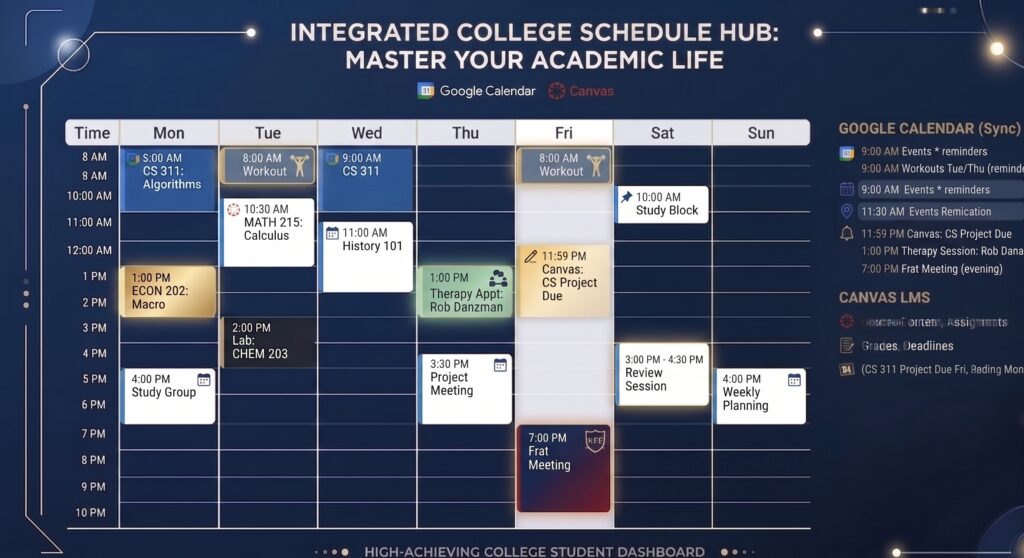
For all of you that need the actionable list out there, here is my go-to calendar setup guide:
- Centralize the Hub: Seriously – Make Google Calendar the single source of truth for all academic, social, and administrative obligations. One calendar to rule them all!
- Automate Canvas Integration: Extract the .ics calendar feed URL from the Canvas calendar tab and import it into Google Calendar via the “Add from URL” function.
- Automate Blackboard Integration: Generate the external calendar link from Blackboard’s global calendar settings and subscribe to it in Google Calendar.
- Color-Code by Urgency: Assign distinct colors to different feeds (e.g., Red for Canvas deadlines, Blue for lectures, Gray for university administrative deadlines).
- Sync the Registrar: Download and subscribe to the university’s official academic .ics calendar to automate drop/add dates and university holidays.
- Block Time for Output: Do not just schedule classes; manually block 2-3 hour windows specifically for deep-work study sessions following challenging lectures.
- Conduct a Weekly Audit: Spend 15 minutes every Sunday night reviewing the upcoming week’s synced deadlines to prevent blind spots.
- Sharing is Caring: Cheesy, but it rhymes. Students need to share their calendars with parents for Freshman and Sophomore years. It provides transparency while we’re practicing handing over the responsibilities of adulting.